| Windows 7 |
Tuesday, May 31, 2011
What is the Difference Between Windows 7 Home Premium, Professional & Ultimate Editions ?
Friday, May 27, 2011
How to Choose The Best Domain Name for You?

Choosing a domain name: Your difficult
questions answered! What domain name should you choose for your business? Is a .com still important? Should you pay hundreds or thousands of dollars for a .com, or just register a .biz or other extension? Are Google search engine ranks affected by whether you have a .com or not?
In this post, I’ll answer these questions and more, and make some recommendations to help you choose the right domain name. Some of my suggestions may be controversial!
Short and Catchy, or Longer?
There are basically two types of domain names: short and catchy or long and keyword-filled. (I define “short” as anything with fewer than 8 characters before the dot.) Which type of domain name you use depends on how you plan to attract visitors to your site. If you plan to mostly attract people by word of mouth, use something short and catchy.I tend to build sites that get most of their traffic from Google. In that case, a keyword-filled domain is preferable. What do I mean by that? Let’s say you own Snazzy Sandwiches in Saskatoon. You’d probably lean toward snazzysandwiches.com or snazzysandwiches.ca (since Saskatoon is in Saskatchewan, Canada.)
But you may also want to consider buying a keyword-driven domain name. In this case, more people are probably searching for “sandwiches in Saskatoon” or “sandwiches Saskatoon” than your business name. Unless you are the only sandwich shop in town, one of the best ways to capture this traffic is to also pick up the keyword-driven name–in this case, sandwichessaskatoon.com or .ca.
The key here is to find out exactly what people are searching for in Google and other search engines, and picking up the “exact match” keyword domain name. That means no “the”, “a”, hyphens, or any other extraneous words. So, if people are typing in sandwiches Saskatoon, you want sandwichessaskatoon as the first part of your domain name.
How Do You Find Out What People Are Typing Into Google?
I’m a big fan of using the free Google Keyword Tool to figure out domain names. Find a keyword that is searched between 10,000 and 50,000 times per month, and see if the exact match domain name is available.Every once in a while, you’ll hit a home run. I had a client once who did marketing for a certain type of business. He paid me for consulting time to figure out how to get more business from his website.
I ran the Google keyword tool for him and found out that business owners were actually typing in the type of the business followed by “marketing” about 800 times a month! Better yet, the exact match .com domain name was available! With some savvy tricks, I helped him conquer 2 of the top 3 slots in Google for those keywords. It added 5 figures a year to the bottom line of his business…and took about three hours of work.
What if the .Com Isn’t Available?
But more often, the exact match .com is not available. It’s either in use or for sale for hundreds or thousands of dollars.Let’s say you’re setting up a site to sell home remedies. You hit up the Google keyword tool and see that “home remedies for acne” is searched 40,500 times a month. (This is true, by the way.) That’s a huge avalanche of traffic if you get ranked #1 for that keyword, and domain names with the keyword in them naturally rank higher than domain names without.
But all the domains are taken. The .com, .net, and .org are all parked–meaning they don’t have any real content on them, and may be for sale. You know the owners will probably want hundreds of dollars for them. The .biz looks like a scam site.
So what do you do? This is a pretty common quandary. Do you go for one of the weird extensions like .cc or .tv, or try to buy one of the more common domains like .com or .net? Or do you just start over from scratch?
First, let’s talk about what all those weird extensions are. Any two-letter extension, like .cc, .ws, and .tv, are actually country codes. Some countries, like Tuvalu, a tiny island nation of just 12,000 people, got extraordinarily lucky in the “domain name lottery”. Tuvalu licensed the .tv extension to Verisign, a top domain name registrar, for “not less than $1 million per quarter.” Wow! (Here’s the entire list of country codes.)
I tread very carefully with these two-letter extensions. Except for ones that have been widely adopted, like .tv and .us, I tend to avoid them. I also tend to avoid .org, unless you just want to set up a blog on it and you’re not selling anything, because .org is, in many people’s minds, still associated with its original purpose of serving non-profit organizations.
In order, I prefer: .com; .net; .biz; .us. Since none of those are available, if you were my client, I would advise you to go back to Google at this point, and search for similar keywords. Sure enough, a similar keyword, acne home remedy, with 27,100 searches per month, has the .biz available, and in this case, I’d advise you to buy that.
But Don’t You Need a .Com?
There’s a myth floating around that you need a .com to rank better in Google. That’s a complete myth, I assure you. For Google, it’s more important to have proper keywords in your domain name than to have the .com.The reason to get a .com is because people tend to assume that your site is the .com. So, if you don’t have the .com and someone else does, that other site will pick up some traffic that would otherwise go to your site.
If the .com is available for registration, go ahead and get it. I recently found a keyword that had 27,100 searches per month, and the .com was available. I immediately snagged it and plan to use it as an advertising-driven niche site. But more commonly, you’ll find the .com is for sale for a few hundred dollars.
In this case, I recommend that you use an alternative extension, set up your website, and then reinvest your profits. That’s what I did with Blog Set Up. I used the Google keyword tool to figure out which domain I wanted, and then bought the .us. The site was profitable immediately, and I reinvested the profits back in to buying the .com version of the domain name. The acquisition closed this week, so blogsetup.us is now blogsetup.com!
In conclusion, I only recommend buying an expensive domain name if you’ve already launched your business and are making money. It’s perfectly acceptable to start your business on a .biz or .us, especially if you’re getting most of your traffic via Google. Then buy the .com with your first profits. If your business isn’t profitable, then, you’re not out hundreds or thousands of dollars with the .com. But if your business is profitable, I recommend snagging the .com as soon as you can afford it.
Do you have thoughts or suggestions on choosing a domain name? Let me hear them in the comments!
Recommended Reading:
- Namecheap. I recommend Namecheap as a good domain name registrar. Never use Go Daddy to register domains.
- Go Daddy. The link here is to a site called nodaddy.com, which was set up by a friend of mine after Go Daddy screwed up his entire business by shutting his domain name down for days. I know another person this happened to, as well. Never use Go Daddy for anything–not hosting, not domain name registration, anything. Again, I recommend NameCheap (above).
Monday, May 23, 2011
What is a CAM, R5, DVDRip, DVDSCR, XviD…?
CAM
A telesync is the same spec as a CAM except it uses an external audio source (most likely an audio jack in the chair for hard of hearing people). A direct audio source does not ensure a good quality audio source, as a lot of background noise can interfere. A lot of the times a telesync is filmed in an empty cinema or from the projection booth with a professional camera, giving a better picture quality. Quality ranges drastically, check the sample before downloading the full release. A high percentage of Telesyncs are CAMs that have been mislabeled.
A telecine machine copies the film digitally from the reels. Sound and picture should be very good, but due to the equipment involved and cost telecines are fairly uncommon. Generally the film will be in correct aspect ratio, although 4:3 telecines have existed. A great example is the JURASSIC PARK 3 TC done last year. TC should not be confused with TimeCode , which is a visible counter on screen throughout the film
A pre VHS tape, sent to rental stores, and various other places for promotional use. A screener is supplied on a VHS tape, and is usually in a 4:3 (full screen) a/r, although letterboxed screeners are sometimes found. The main draw back is a “ticker” (a message that scrolls past at the bottom of the screen, with the copyright and anti-copy telephone number). Also, if the tape contains any serial numbers, or any other markings that could lead to the source of the tape, these will have to be blocked, usually with a black mark over the section. This is sometimes only for a few seconds, but unfortunately on some copies this will last for the entire film, and some can be quite big. Depending on the equipment used, screener quality can range from excellent if done from a MASTER copy, to very poor if done on an old VHS recorder thru poor capture equipment on a copied tape. Most screeners are transferred to VCD, but a few attempts at SVCD have occurred, some looking better than others.
Same premise as a screener, but transferred off a DVD. Usually letterbox , but without the extras that a DVD retail would contain. The ticker is not usually in the black bars, and will disrupt the viewing. If the ripper has any skill, a DVDscr should be very good. Usually transferred to SVCD or DivX/XviD.
A copy of the final released DVD. If possible this is released PRE retail (for example, Star Wars episode 2) again, should be excellent quality. DVDrips are released in SVCD and DivX/XviD.
Transferred off a retail VHS, mainly skating/sports videos and XXX releases.
TV episode that is either from Network (capped using digital cable/satellite boxes are preferable) or PRE-AIR from satellite feeds sending the program around to networks a few days earlier (do not contain “dogs” but sometimes have flickers etc) Some programs such as WWF Raw Is War contain extra parts, and the “dark matches” and camera/commentary tests are included on the rips. PDTV is capped from a digital TV PCI card, generally giving the best results, and groups tend to release in SVCD for these. VCD/SVCD/DivX/XviD rips are all supported by the TV scene.
A workprint is a copy of the film that has not been finished. It can be missing scenes, music, and quality can range from excellent to very poor. Some WPs are very different from the final print (Men In Black is missing all the aliens, and has actors in their places) and others can contain extra scenes (Jay and Silent Bob) . WPs can be nice additions to the collection once a good quality final has been obtained.
A DivX re-enc is a film that has been taken from its original VCD source, and re-encoded into a small DivX file. Most commonly found on file sharers, these are usually labeled something like Film.Name.Group(1of2) etc. Common groups are SMR and TND. These aren’t really worth downloading, unless you’re that unsure about a film u only want a 200mb copy of it. Generally avoid.
A lot of films come from Asian Silvers/PDVD (see below) and these are tagged by the people responsible. Usually with a letter/initials or a little logo, generally in one of the corners. Most famous are the “Z” “A” and “Globe” watermarks.
These are films put out by eastern bootleggers, and these are usually bought by some groups to put out as their own. Silvers are very cheap and easily available.
R5 refers to a specific format of DVD released in DVD Region 5, the former Soviet Union, and bootlegged copies of these releases that are distributed on the Internet. In an effort to compete with movie piracy, the movie industry chose to create a new format for DVD releases that could be produced more quickly and less expensively than traditional DVD releases. R5 releases differ from normal releases in that they are a direct Telecine transfer of the film without any of the image processing common on DVD releases, and without any special features. This allows the film to be released for sale at the same time that DVD Screeners are released. Since DVD Screeners are the chief source of high-quality pirated movies, this allows the movie studios to beat the pirates to market. In some cases, R5 DVDs may be released without an English audio track, requiring pirates to use the direct line audio from the film’s theatrical release. In this case, the pirated release is tagged with “.LINE” to distinguish it from a release with a DVD audio track.
VCD is an mpeg1 based format, with a constant bitrate of 1150kbit at a resolution of 352×240 (NTCS). VCDs are generally used for lower quality transfers (CAM/TS/TC/Screener(VHS)/TVrip(analogue) in order to make smaller file sizes, and fit as much on a single disc as possible. Both VCDs and SVCDs are timed in minutes, rather than MB, so when looking at an mpeg, it may appear larger than the disc capacity, and in reality u can fit 74min on a CDR74.
SVCD is an mpeg2 based (same as DVD) which allows variable bit-rates of up to 2500kbits at a resolution of 480×480 (NTSC) which is then decompressed into a 4:3 aspect ratio when played back. Due to the variable bit-rate, the length you can fit on a single CDR is not fixed, but generally between 35-60 Mins are the most common. To get a better SVCD encode using variable bit-rates, it is important to use multiple “passes”. this takes a lot longer, but the results are far clearer.
These are basically VCD/SVCD that don’t obey the “rules”. They are both capable of much higher resolutions and bit-rates, but it all depends on the player to whether the disc can be played. X(S)VCD are total non-standards, and are usually for home-ripping by people who don’t intend to release them.
XviD & DivX are the most commonly encoded movies. DivX used to be the most popular, until it went from open source to a corporation that bought the rights & started charging for it (although the crack can easily be obtained for the DivX encoder, most people have switched to XviD, not only because it is open source, but also because it is superior in many ways). In the last year or so, many stand-alone DVD players have been released that are capable of playing DivX/XviD movies (even on CDRs), which has made this the most popular form of encoding. The majority of XviD/DivX rips are taken from DVDs, and are generally in as good quality as possible that can fit on one 700MB CDR disc, which is why most XviD/DivX movies are almost exactly 700MB, so they can be burnt onto a CDR & played in these new DVD players (which can be purchased just about anywhere for as little as $30-$40 USD). Various codecs exist, the most popular at the moment being the new XviD 1.2 codec. DivX encoded movies will definitely play on these new DVD players, & it only takes a little simple tweaking by the ripper to ensure XviDs will play on them as well, but it is therefore not guaranteed. (If you want to learn more about XviD/DivX encoding so you can make your own DVDrips, just visit doom9.org)
x264 is a free software library for encoding H.264/MPEG-4 AVC video streams. (More to come.)
CVD is a combination of VCD and SVCD formats, and is generally supported by a majority of DVD players. It supports MPEG2 bit-rates of SVCD, but uses a resolution of 352×480(ntsc) as the horizontal resolution is generally less important. Currently no groups release in CVD.
Is the recordable DVD solution that seems to be the most popular (out of DVD-RAM, DVD-R and DVD+R). it holds 4.7gb of data per side, and double sided discs are available, so discs can hold nearly 10gb in some circumstances. SVCD mpeg2 images must be converted before they can be burnt to DVD-R and played successfully. DVD>DVDR copies are possible, but sometimes extras/languages have to be removed to stick within the available 4.7gb.
MiniDVD/cDVD is the same format as DVD but on a standard CDR/CDRW. Because of the high resolution/bit-rates, its only possible to fit about 18-21 mins of footage per disc, and the format is only compatible with a few players.
Thursday, May 19, 2011
Cracking Winrar: A step-by-step approach
In any case you disagree with the above statement, stop here.
The Tools
To perform this hack you will be needing -- Any De-assembler (I use Hackers Disassembler and Hview )
- Resource Hacker
- A patch Creator ( Use Universal Patch Creator or Code fusion)
How to Crack ?
You need to have a bit knowledge of assembly language,and in case you don’t have it,just cram the steps and it will work anytime,every time. Download the latest version of WinRAR from their website and install it.I will be cracking Winrar 3.80 here (cuz I already have it:P ). This is basically a 2 step process ( 4 step ,if you want to do things with a professional touch,period) .

Now copy the WinRAR.exe file to desktop. Make a copy of it there.
Step 1 – Hunting for Memory Address
Now load Hackers Disasembler and load the copy in it.
The Disassembler will disassemble the executable in assembly code. Now you need to search for strings that are used in WinRAR program. Press Ctrl + F and type “evaluation” without quotes and search in the assembly code. Hit enter…

After you have reached this block of code by searching, just look at the block of code above it. There you will find that some assembly values are being compared and then code is jumped to some other function. Now see carefully, the “evaluation copy” function must be invoked after some specific condition is met. We need to look for it at the code and the make certain changes to the condition so that the program doesn’t checks for the condition.

In the above code you can see this code -
00444B6A: 803DF4B84B0000 cmp byte ptr [004BB8F4], 00 00444B71: 0F859B000000 JNE 00444C12This is the code responsible for validating you as a legal user :) . Just note down the memory address that leads to jump (JNE) at some memory location. In this case, note down 00444B71.
Note : For any WinRAR version, this code and memory address might be different,but the JNE will be same. Just note down the respective memory address that checks.
Now you need to search for the code that brings that ugly nag screen “Please purchase WinRAR license” after your trial period of 40 days is over. For this,look over your toolbar and click on “D” which stands for looking for Dialog references.

Now in the dialog box that opens,search for “please” and you will get the reference as -
ID-REMINDER, “Please purchase WinRAR license”

Double click on it and you will reach the subsequent code.

The code will be something like
* String: “REMINDER” 0048731A: 68EB5E4B00 push 004B5EEBJust note the memory address that invokes the REMINDER dialog. In this case its 0048731A. Note it down.
Note : For any WinRAR version, this code and memory address might be different.But the Reminder Memory address code will always PUSH something. Just note down the respective memory address that PUSH ‘s.
Step 2 – Fixing and Patching
Now in this step we will be patching up values of memory addresses we noted earlier. I will be doing this using HVIEW.Now load the copy you disassembled in Hacker’s Disassembler in Hview.

After you have loaded it, you will see the code is unreadable. Its just like opening an EXE file in notepad. You need to decode it. To do that, just press F4 and yoiu will get an option to decode it. Hit DECODE and you will be able to see code in the form of assembly code and memory addresses.

After you have done that, you need to search for memory addresses you noted down earlier. Just hit F5 and a search box will be there. Now you need to enter the memory address. To do that, enter a “.” and the type memory address neglecting the earlier “00” . The “.” will suffice for “00”. ie -
Type .444B71 in place of 00444B71

and search in the code.

After you have reached the respective code, you need to make changes to it. Press F3 and you will be able to edit the code.Now make the following changes –

After you have done it, save it by pressing F9.
Now search for next memory location by pressing F5 and entering it. Reach there and make the following changes by pressing F3 -

Save the changes by pressing F9 and exit HVIEW by pressing F10.
Congrats…You have cracked WinRAR :) Replace the original WinRAR.exe with this copyofwinrar.exe by renaming it. It will work 100% fine :P
Step 3 – Spicing up the EXE
Now U have a 100% working version of EXE, you might want to change your registration information in WinRAR. TO do this, you can use Resource hacker.
Launch Resource Hacker, load the copyofwinrar.exe in it

Now go to DIALOG –> Expand tree –> ABOUTRARDLG and click it. Now Find Trial copy line and replace it with your favorite one :P

and click on Compile Script button.

Now save the file with any name on your desktop or any location what so ever.

Now you have a fully patched WinRAR.exe file :)) you can either use it, or also can distribute it like a real cracker. If you want to learn that, move on to next step.
Step 4 – Creating a working Patch (or giving Professional touch :P )
I will be using diablo2oo2′s Universal Patcher (UPE) for creating the patch. The patch will work like any authentic one for that WinRAR version. Just like the one U downloaded at anytime of your life from any Crack and Keygen website.Launch Patch Creator and click on add new project. Enter project Information and click on save.

Click on Add – > Offset patch

After you have done that, double click on offset patch and then
- Give path of original winrar.exe
- Give path of unmodified Winrar.exe (again)
- Give path for fully patched Winrar.exe (ie Cracked Winrar.exe in this case)
- Click on compare and it will show difference between both files
- Click on save.

Now in the next window, click on Create Patch and save it. The Patch will be created. Now copy it in WinRAR installation directory and hit on patch, it WILL

Congrats you have created a patch of your own and have learned to crack WinRAR :)

You can crack other software in the same way…just practice, debug and disassemble and you will get the way :)
Thursday, May 12, 2011
Adding “Read More” Expandable Posts Link on Your Blog Posts
This is a pretty popular Blogger hack that lots of people have asked me about. Instead of answering to each email individually, I thought it would make more sense to write an article about it.
With this hack, you can choose to display a select amount of text from the beginning of each post as a teaser instead of showing the entire post on the front page of your blog. Then when people want to read the rest of the post, they can click a “read more” link to see the full post. This is very handy if you have lots of long articles all on one page. (Note that you’ll need to have post pages enabled in order to make this feature work.)
Step #1 – Update Your Template Code
First you need to edit your existing code so I recommend copying and pasting it into notepad or any text editor. Also, it’s smart at this point to create a backup of your template just in case something goes wrong. Now do a search (CTRL + F) within the text editor for the following code post-header-line-1. This is the default code that Blogger includes but some custom templates remove or change this code so you might have trouble finding it. If you can’t locate this text then try searching for <data:post.body/> instead. Your template will for sure have this since it’s the tag that actually prints the body of your post.Now depending on which code you were able to find will determine how easy the next steps will be. You might need to do some detective work first in order to get this working properly in your custom template. The idea is to get this new code into your template before the <data:post.body/> tag. Keep reading and hopefully the explanation will illustrate the concept clear enough so you are able to adapt this hack to your custom template.
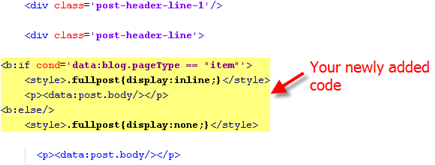
Add the following code below the <div class=’post-header-line-1′/> and <div class=’post-header-line’> tags if you’ve got both.
<b:if cond='data:blog.pageType == "item"'>
<style>.fullpost{display:inline;}</style>
<p><data:post.body/></p>
<b:else/>
<style>.fullpost{display:none;}</style>The result should look something like this:

If you don’t have the default
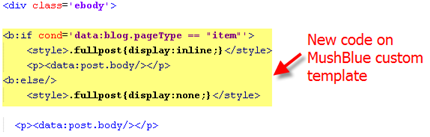
<div class='post-header-line-1'/> tag then your result should look something like this instead. This is how it would be done in the MushBlue Blogger custom template:
Notice in both examples that the code in yellow and the <data:post.body/> tags are the same — it’s just tag above it that will differ based on the template you’re using.
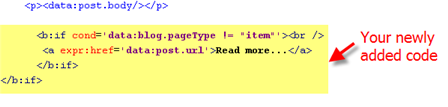
Now let’s add one more bit of code which will actually create the “read more” link in your post. This code will go below the <data:post.body/> tag so copy the following and paste it in. Feel free to change the “Read more…” text to whatever you want the link to look like. Be careful not to delete any other code during this process.
<b:if cond='data:blog.pageType != "item"'><br />
<a expr:href='data:post.url'>Read more...</a>
</b:if>
</b:if>Yes, there are supposed to be two </b:if> tags in the above code so don’t think it’ s a mistake. The result should look like this:

This code will be the same no matter what template you are using. Just make sure it goes below the <data:post.body/> as shown in the image above.
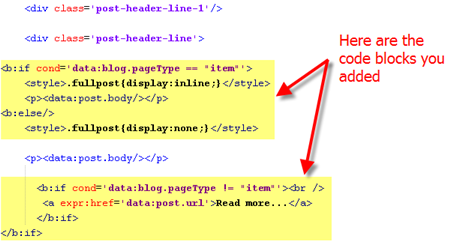
Now let’s look at what the final result should be. Here’s the updated code block you just worked on all put together:

Ok, you’re all done editing the template code. Paste it back into your Blogger html window and save it. If you get an error, you made a mistake. The most common mistake is to accidentally delete a > or < while pasting in the new code. If it saved successfully, it’s time to move onto the next step and modify a quick Blogger format setting.
Step #2 – Add a Class Tag in Your Default Post Template
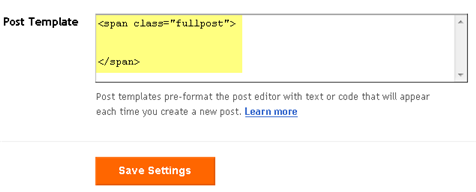
For this step, you need to navigate in your Blogger account to “Settings” => “Formatting” and scroll all the way down to the bottom. It’s the last option called “Post Template”. You’re going to paste in the following code:<span class="fullpost"></span>You’ll want to keep the spaces in there which will make sense later. After you save this, it will look like this:

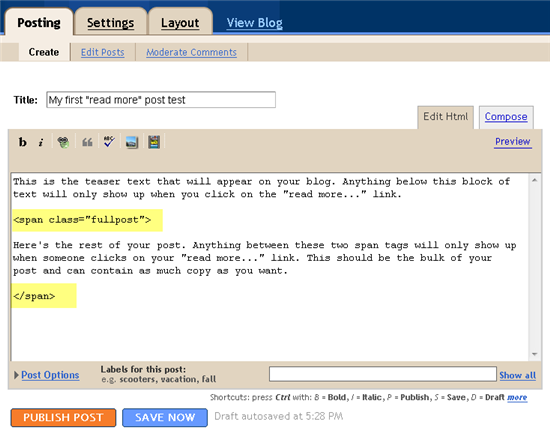
Step #3 – Create a New Post
Ok, we’ve got everything all setup so it’s time to go and test it out. Hopefully you’ve got a new post in mind for your blog. If not, then we’ll just create a test post which you can later delete. When you click on the “Posting” tab, you’ll notice that the post text area is now pre-populated with the <span class=”fullpost”> and </span> tags. If not, then you didn’t save it properly so go back and re-read step #2.So when writing your new post, anything you put above the <span class=”fullpost”> tag will be the teaser text. The main body of your post needs to go in between the <span class=”fullpost”> and </span> tags in order for the “read more…” link to work properly. See the screenshot below. Sometimes pictures illustrate better than words.

Now publish or preview your post to see the “read more” hack working on your blog. If it doesn’t show up for some reason, go back and run through the steps again. Most likely you pasted the code blocks in the wrong places. It’s difficult to troubleshoot these issues since each template can be unique so please make sure to double-check your template before asking for help in the comments section below.
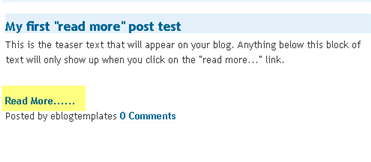
Here’s the live post with the “read more…” link properly working based on the text I used above in the post text area.

Additional Info
If you want to go back and update your old posts with this new “read more…” feature you can. Just go back and edit each post manually. Essentially you’ll need to paste in the <span class=”fullpost”> and </span> tags breaking apart the post into two parts.For some posts, you might not want to use this feature at all. If that’s the case, just delete the <span class=”fullpost”> and </span> tags from within your new post text area. Then your new post will show up entirely just like it used to before you implemented this hack. Enjoy!
ICC 2015 Cricket World Cup Logo Unveiled
Since the event is being jointly hosted by Australia and New Zealand, the logo is a mix of motifs taken from the indigenous people of Australia (Aborigines) and of New Zealand (the Maoris).
The selected motifs are:
* Maori Tohora symbolizing toughness, pride and tribal culture
* Aboriginal journey tracks symbolizing spirit of the land
The upper body is taken from the Moari motif while the legs and the bat are taken from the Aboriginal motif.
The logo is designed to signify toughness, glory, resilience, connection and belonging.
The Australian arm of FutureBrand was invited to produce the logo for the ICC Cricket World Cup 2015.
Overall, I liked the logo as it incorporates the indigenous aspects of both countries much like how the 2011 ICC World Cup in India had a very sub-continental look. The colors though are slightly dull and probably could have been brighter. Looking forward to another exciting event in 4 years.
Monday, May 9, 2011
Top 10 websites for downloading movie subtitles
Some movies are released without subtitles, one of the reasons is that subtitles will make your attention distracted from the emotions and activities of the actors or actresses. But some people need movie subtitles, or they have no idea what the actors or actresses are saying.
That’s why there are some websites that offer movie subtitles download, and among those websites, below 10 are the most popular and you can download movie subtitles from them for free without registrations.
1. Subscene.com

On Subscene.com, you can search movie subtitles by film title or release name, you can filter the search results by languages, and you can also rate or upload movie subtitles.
2. Opensubtitles.org

Opensubtitles.org offers more than 820,000 subtitles for DivX movie, you can search them by languages, you can download them directly, and you can also upload new movie subtitles.
3. Allsubs.org

Up till now, Allsubs.org has more than 1,800,000 subtitles for about 870,000 movies, you can search the movie subtitles by languages, you can sort the results by the movie names, and you can also upload movie subtitles.
4. AnySubs.com

AnySubs.com offers DivX subtitles of movies and TV series, you can search the movie subtitles by languages, by movie names, or by latest movies, you can also upload movie subtitles.
5. Subtitlesource.org

Subtitlesource.org offers free subtitles for DivX, XviD and x264 movies and TV series, you can search the movie subtitles, you can filter the results by languages or qualities, and you can also upload new movie subtitles.
6. Moviesubtitles.org

Moviesubtitles.org also offers multiple-language subtitles for movies, you can search movie subtitles by the latest subtitles, the most downloaded subtitles or the most popular movies.
7. Subs4free.com

On Subs4free.com, there are only English and Greek subtitles for movies and TV series. You can search the movie subtitles by languages or movie formats (such as DVDrip).
8. Sub-titles.net

Sub-titles.net offers more than 530,000 free subtitles for movies and TV series, you can search the movie subtitles by languages, you can also check out the latest subtitles uploaded.
9. Podnapisi.net

Podnapisi.net and Sub-titles.net are both owned by Unimatrix-One and they have the same movie subtitles, but Podnapisi.net offers more services, such as covers, forum, VIP users, etc, and Sub-titles.net is faster.
It seems that Podnapisi.net and Sub-titles.net only support IE browsers.
10. Subtitles.images.o2.cz

Subtitles.images.o2.cz offers multiple-language subtitles for movies, besides search, you can also check out the top downloaded subtitles, the newest subtitles or the coming soon subtitles.
Sunday, May 1, 2011
The Top 10 Alternatives to Google Adsense
Google's terms and conditions are very strict such that many web publishers cannot use adsense adverts on their sites. They are either denied from joining the Google AdSense program in the first instance, or in a situation that is becoming more and more common do not wish to do business with Google. A number of publishers are also finding their Adsense accounts are being disabled for reasons that are completely beyond their control. The problem is that most of the alternatives to Google's Adsense are pretty useless. Most of the good ones (such as doubleclick) are only interested in very large volume customers and so are not interested in the little guy with his blog who wants to earn a small income on the side. For this reason I have compiled my Top 10 alternatives to Google's Adsense that are ideal for the small time publisher. This site provides an updated list of the best website monetization programs that are available to webmasters.
If you are a advertiser then you may be interested in these best alternatives to adwords.
Has your adsense account been disabled? Then try these top 10 alternatives.
AdBrite
Bidvertiser
Chitika
Infolinks
Pocket Cents
Kontera
Clicksor
Exit Junction
Dynamic Oxygen
AdBull
Note: The descriptions are based on personal experience and do not represent any form of endorsement.
1) AdBrite
AdBrite, is currently one of the best alternatives there is to Google's adsense. While they do not offer the same large selection of ad formats that Clicksor and Google Adsense provide you they do offer the most commonly used ones. In addition they offer inline page links with have some great click through ratios as well as interstitial full page ads which offer an excellent way to monetize all traffic to your site not just traffic that clicks on your ads. Their payouts are also very competitive. They have more relaxed terms and conditions than Adsense and are much more accepting of smaller publishers including bloggers.
If you're a publisher, use AdBrite to set your own ad rates, and approve or reject every ad that's purchased for your site or just have AdBrite auto accept ever ad. AdBrite enables you to instantly sell ads to your visitors via a "Your Ad Here" link, in addition to selling through AdBrite's marketplace and sales team.
Revenue is typically split 75/25 in your favor. Through a small snippet of HTML placed on your site, they handle serving, scheduling, billing, customer service, and sales. About half of AdBrite's sales are generated from the marketplace and sales team, while the other half are generated from users clicking "Your Ad Here" on your website.
While AdBrite can provide publishers with more revenue and better ads than traditional ad networks such as Google AdSense, they work fine along-side them as a way for you to generate additional ad revenue by selling ads directly to your visitors -- something the other ad systems don't do. Ad Brite also lets you select your own minimum bid prices and give you the option of showing an alternative ad service such as Clicksor when bid prices fall below your minimum.
If you're using AdBrite on your website you also have the option to turn off AdBrite's "run-of-network ads" and AdBrite will only display ads that have been approved by you allowing you to prevent competitors ads being shown on your site. If you have no ads running, AdBrite will display nothing but "Your Ad Here" or your alternative ad provider.
Note, from my experiences it can take a day or so from when you signup with AdBrite and put their code on your website to actually start seeing relevant ads showing up. So if you see the message "Advertize on this site" just be patient and give it a day or so and you should start seeing relevant ads showing up.
AdBrite also accepts Blogs and Bloggers as sites so if you are fed up with other programs turning you down because their terms and conditions restrict Blogs try AdBrite.
2) Bidvertiser
Bidvertiser is an excellent alternative to Google and offers some intriguing ad formats including what they refer to as free design. This lets you specify the look and dimensions of your text ads. While a useful feature I have not investigated how well it works but imagine that while it sounds good on paper it could result in lower priced ads being displayed. I.e. most advertisers will probably want to keep control of the layout of their ads and so turn off support for Free design ads. All the standard ad formats exist, however, and the payouts are excellent. Pop-under ads and XML feeds are also supported. Bidvertiser have also recently introduced two knew features that can boost your earnings:
Conversion Bonus
As far as I am aware Bidvertiser is the first affiliate marketer to offer this seemingly obvious service. As well as paying traditional CPC for each valid click Bidvertiser will now track those clicks and if they turn into valid leads will pay an additional conversion bonus to the publisher. If your site refers a number of high value leads this can lead to a substantial monthly bonus. In many cases this additional bonus can be higher than traditional CPC earnings.
Revenue Generating Toolbar
The second new feature offered by Bidvertiser is the customized revenue generating toolbar. The BidVertiser Toolbar allows you to distribute your own customized toolbar to your website visitors and then earn money when your users use the toolbar for searching. The toolbar is fully customizable allowing logos to be changed, links to your home page added, useful tools, direct program links etc.
Bidvertizer pays you either in $100.00 increments by check or $10.00 increments by PayPal. They also do not require you to complete any tax information or provide a social security number.
Maximum customizability for the layout of your ads: BidVertiser gives you a simple point-and-click tool to help you customize the layout of the ads to fit your site's look and feel, in order to retain the high quality of your website. Bidvertizer also offers the opportunity to block unwanted ads. The reports provided by Bidvertiser are adequate but not outstanding. The only real problem is that it has been reported that they can be picky with who they accept into their program and can be quick to ban users whose websites show what may be perfectly valid fluctuating visitor behaviour. Although I have not heard any recent reports so they may have relaxed this policy somewhat. Click here to visit Bidvertiser's website where you can either sign up as a publisher (show peoples ads on your site) or as an advertiser (show your ads on other sites).
As an advertiser you can get $20 in free clicks by following this link: Bidvertiser Advertise and get $20 in free clicks.
3) Chitika
Chitika - The Leader in Impulse Merchandising
Chitika (pronounced CHIH-tih-ka) was founded in 2003 and is the industry's leading impulse merchandising company. Chitika was founded in May 2003 and is based in Massachusetts. Chitika (pronounced CHIH-tih-ka) helps web publishers generate revenue using innovative publisher-side advertising and merchandising solutions and services.
Chitika began, not as a stand alone advertising solution but instead as way to compliment existing advertising / publishing programs through the use of additional Ad Units which were altogether different from the standard ad boxes, pop-unders etc that everybody else provided. Instead of displaying these 'industry standard' advert boxes with text and image ads that all look the same Chitika instead provided active boxes that showed targeted products from different manufacturers. If you ran a blog for example and discussed a product you might have found the Chitika box showing links for this product and competitors products. If people purchased these products you would get paid a commission. This was referred to as impulse marketing in the form of Premium Ad Units (eMinimalls).
Chitika has now progressed, however, into a fully fledged advertizer service. The eMinimalls initially evolved into advertizing units that would show adverts based on what people searched for to get to your site. This is subtly different from the standard keyword driven advertising since it shows ads that are more relevant to the original intent of your visitors search. This greatly increases the chance that someone will click on an ad. This type of advertising is still offered by Chitika and is a good addition to a site containing traditional banner ads. For example you could use it to compliment another advertizers service. E.g. you could show Clicksor context sensitive ads on your site and then compliment these with Chitika's search traffic oriented ads.
However, Chitika now goes beyond this, also offering what are termed premium ads. Chitika uses it custom "Click Prediction" technology to show select ads when there is a greater chance they will be clicked on. This is obviously a great way to improve your revenue.
For advertisers and media buyers, Chitika is a proven channel for targeting on-line consumers and qualified buyers. For all publishers, Chitika is an easy-to-use platform for earning daily ad revenue. If you visit a site showing Chitika's ads from a search engine then the Chitika premium ad unit kicks in showing you ads that are specific to your searching - otherwise you can have it show an alternative ad provider, such as adsense, or you can just have it collapse away to show nothing.
Recently added new features from Chitika include:
List Unit
The Chitika List Unit (CLU) is a powerful extension of the MPU which automatically adjusts its height, ensuring no ugly white-space and thus a cleaner user experience. These can also be referred to as rotating ads. Such units really come into their own on devices such as iPads which support dynamically rotating screens. With the use of a rotating CLU you can have your ad automatically adjust to fill all the space on the screen. This also draws the users eye to the ads and makes it more likely for them to click on one.
Mobile Code
Adverts specifically designed to be shown on mobile content.
Chitika's search based advert units allow you to display targeted products based on what people searched for to get to your page and you get paid for clicks. Chitika offers payment by PayPal (with a $10 minimum) or via Check (with a $50 minimum).
Click here to visit Chitika's website and sign up today.
4) Infolinks
A relative newcomer to the scene Infolinks specializes in In-Text Advertizing. That is it indexes your page looking for keywords and phrases that are not currently links and converts them into advertizing links. When a user places their mouse over the link a box opens up showing the ad. If they click on the link you get paid. It is very simple and works very effectively. The nice part is that you can use Infolinks to compliment an existing advertizing campaign on your website. For example you can show banner ads with AdBrite or Bidvertiser and show text links with Infolinks. Or you can even show text links with both AdBrite and Infolinks together on the same page to maximize your revenue.
Infolinks claims to be leading the industry with the most relevant in-text advertising links and the highest revenue share - guaranteed. I am not sure how they 'guarantee' this but having used them for several months I can attest that their payouts are indeed good compared to other In-Text advertizing options.
In-Text advertizing is also useful if you have a site under construction. For example, suppose you have built a list of links but have not added all the links yet. Infolinks will parse your page and convert a lot of these into links. People then think these are part of your site, click on them and you get paid. The unobtrusiveness makes it a very attractive way to monetize your site without inundating and alienating your visitors with flashing banners, pop-ups etc.
Additionally Infolinks has just added a new feature called Related Tags. Related tags allow you to increase your clicks and earnings while adding valuable informational tags within your website's content. The Infolinks algorithm will choose the best keywords for the page and display them as tags within the Related Tags cloud. Just like In text ads, when a visitor hovers over the tags, an Infolinks advertisement bubble will appear, and each click will award your account additional revenues.
Infolinks pays you either by bank wire, Automated Clearing House (ACH) ($400 minimum), or by PayPal ($50 minimum). Intriguingly they also offer payment via a prepaid Mastercard that will be refilled with your earnings each month. This is an interesting approach to payment and may be useful for international customers without PayPal or US Dollar bank accounts. However, the fees for this prepaid card appear to be fairly steep.
Infolinks' features:
Quick and easy setup with no changes to your website.
Ads are tightly integrated with your content - no additional space required.
Free sign up with no commitments or risk.
User triggered, less intrusive advertising that won't distract from your site's content.
Highly relevant In-Text ads for your site visitors with record high conversion rates.
Related tags.
Click here to visit Infolink's website and signup for an account to give them a try. As with most alternatives to adsense it is free and there is no obligation.
5) Pocket Cents
A relative new comer to the field is Pocket Cents. Pocket Cents has been built from the ground up as a Click Banner provider. Specializing in automatic focus on local markets Pocket Cents offers an intriguing alternative to adsense/adwords. While unlikely to replace your entire creative portfolio, Pocket Cents does off an attractive alternative for banner ads. It could also act as a good alternative ad provider for backfill from one of the larger networks.
Pocket Cents' claim is that:
"Location based advertisements generate precisely targeted traffic to your website increasing internet sales and decreasing advertising costs."
It remains to be seen how effective this will ultimately be but the idea, from a publishers perspective is that it gives you a higher click through rate and therefore better earnings from CPC ads. They also offer a flat rate on clicks meaning as a publisher increasing your website revenue simply means optimizing clicks. Experience to date though shows that payouts per click can be VERY good so it is definitely worth a try. The following shows an example banner ad from Pocket Cents.
Online Degrees
Earn an Online Degree that will help you enter the career path of your choice!
ClassesAndCareers.com
Online Degrees
Compare Online Programs & Financial Aid Options for you to Earn Your Degree Online!
ClassesAndCareers.com
Advertise Here
Target customers in your local area!
www.pocketcents.com
Click here to visit Pocket Cents and sign up for a no obligation account today.
6) Kontera
Kontera works in a similar way to Infolinks above, however, they have been around for much longer. Traditionally it was hard to get accepted by Kontera but they seem to have relaxed their restrictions of late. This is especially true for website publishers and affiliate marketers that do not have high daily page impressions.
Kontera is extremely easy to use. You simply add a few lines of code to the end of your webpage and within 24 hours additionally links start showing up on your page that serve Kontera Ads. While this service does not provide you with a complete replacement for all your ads, since they do not provide banner creatives etc., it does provide an additional way to increase the revenue your site can generate. The links are context sensitive and relevant so click through ratios can be very high for well designed sites.
Some of the features offered by Kontera:
The best payout in the business.
Premium ads with market-leading CPC.
Record high CTRs.
The best relevancy and user experience.
Works within your text � no extra space required.
Takes only a minute to set up.
Kontera is nice because it is simply Plug and Play and it provides an additional revenue stream for your website. It does not require any additional space or layout considerations since it integrated directly with your text. In my opinion the inline text ads also look smarter than a lot of other offerings.
Kontera provides payment by PayPal with a $50 minimum payout.
7) Clicksor
Clicksor is one of the current leaders of the small publisher Adsense competition. They have payouts upto a market leading 85% and unlike a number of alternatives the cost per click bid values are high enough that you can earn a decent income. They are also, in my experience, much more tollerant than Google. Their terms and conditions suggest that you should only place one copy of their code on a page but as long as you only place a single pop-up or DHTML code on a page they seem happy to let you place many context sensitive ad blocks on a single site.
Clicksor also has a big advantage over a number of the lower ranked alternatives on this site in that their ads are truly context sensitive. Thus while you can provide keywords they have technology that will also show ads targeted to the content of your site. This means your visitors are exposed to ads of the same subject as they were searching for when they reached your site and thus vastly increases the click thru ratio and thus your sites earning potential. The context sensitive nature also saves you the hassle of having to specify keywords for all of your sites and decide in advance what people might be looking for.
The online stats provided by Clicksor are not perfect but they are enough for you to keep track of the trends with your site. They also allow you to add as many sites / domains as you want under a single account. You also only need the root page of your site approved. Once this is done you can place ads on all of your sub pages.
The payment schedule with Clicksor is also much better geared to the small site owner. In any pay period in which your earnings exceed $50.00 ($20.00 with PayPal), payments are made either by check or instantly through PayPal ($20.00 minimum for PayPal). Revenue totaling less that $50 (PP $20) will rolled into the following period. The pay period is based on a 15 day schedule so you can get paid much more frequently. Clicksor also do not require a Social Security (SSN) or Individual Tax Identity Number (ITIN) to join and so while this 'technically' does not help US site owners with their tax liability it does make it much easier for non US citizens to join up and start earning revenue.
That said I have had several reports of late about Clicksor becoming more picky about who they accept and rejecting accounts. This is especially true of sites not based in the USA, Canada or the UK as well as sites not predominantly in English. I have also seen issues with their reporting of earnings, especially referrals not working properly. Thus I have moved them further down the list but I still recommend you to try them.
Advert wise Clicksor features:
Multiple formats available including text, image and animated ads.
Text Links
Image Ads
Flash Ads
Animation Ads
Banners
Pop unders
Interstitial Ads (NEW)
Dynamic (DHTML) highlighting
8) Exit Junction
Exit Junction is relatively new and, I believe, a spin off from the now defunct Revenue Pilot. While Revenue Pilot has stopped running, however, Exit Junction is going from strength to strength. Exit Junction offers a unique approach to advertising that is compatible with all the other Ad Networks included Google Adsense. The key to Exit junction is that they focus on showing ads to users as they leave your site rather than as they arrive or as they browse. This approach offers you an additional way to monetize your traffic and also capture ad revenue from those that stumble upon your site from a search engine and then immediately leave.
By adding a small piece of Exit Junction code to the header section of your site users are shown an advert as they hit the back button. For example, if a user came to your site from a Google search and then immediately hit the back button to return to that search they would be shown an Exit Junction Ad in between your page and the Google search and you get paid for this impression. The ad is directly targeted to the search term that brought the visitor to your site in the first place. Hence Exit Junction is an ideal way of complimenting your existing ad services and so increasing your sites revenue without having to switch from your current ad provider.
Exit junction also covers all countries. You get paid for all traffic exiting you site regardless of its origin.
They offer fee free payout via Check or PayPal with earnings of as little as $25 on a monthly basis.
9) Dynamic Oxygen
Dynamic Oxygen are a relative newcomer to the field having really only started at the end of 2010. However, they are growing quickly and offer an excellent alternative to the traditional Adsense route. Dynamic Oxygen enables publishers of all sizes to realize their full revenue potential! One of the nice things being that they are not focused purely on the high end, very high turnover publishers but instead cater to sites of all shapes, sizes and popularity. This also includes most international sites. Unlike many ad providers that only cater for US or European traffic, DynamicOxygen supports and pays out for worldwide traffic making it ideal for non-US based publishers.
In particular they feature:
Benefit from targeted ads with High eCPM for your ENTIRE traffic.
Get paid for all your international traffic.
Enjoy unique ad formats not found elsewhere, such as Interstitials, Layer Ads, Peeler Ads, Anchor Ads, and more...
Enjoy timely payments.
Superb Support
DynamicOxygen provide payment via PayPal, Check or Wire Transfer with $50 minimum payouts. You can sign up for a no obligation, risk free account and give DynamicOxygen a try by following this link.
DynamicOxygen.com - Enjoy High eCPM Rates!
10) AdBull
The final service worth looking at as an alternative to Google Adsense is AdBull. AdBull is relatively easy to sign up for an your account will be active immediately. It will still be reviewed for formal acceptance but this gives you a chance to show the person doing the review what the ads will look like on your site making your chances of being accepted much much higher. AdBull offer a range of services mostly similar to that offered by the other services described here. This includes CPC, CPM and CTR. Current Click Thru Rates run about 3-5% which puts them on the high side of most services. CPMs run around $1.00 to $1.50 per 1000 page loads allowing you to make a substantial amount of money hosting your site's ads through AdBull. Some of the benefits of AdBull include:
Adds to existing revenue
No delayed page loads - we are the last item to load
Ads are relevant to your site's content
Ad only appears once every 12 hours, per unique visitor
The fact that ads are focused to individual visitors means your visitors are not presented with the same ad on every page of your site they visit so increasing the Click Thru Rates that you are likely to see. You can sign up for a no-obligation publishers account by following this AdBull link.